NZ180/5 (20 ov)
 IND
IND NAM95/2 (21.1/50 ov)
 IRE
IRE MOZ
MOZ UGA
UGA AVL
AVL MNC
MNC RAY
RAY ELC
ELC GMB
GMB ZMB
ZMB NGA
NGA LES
LES CAG
CAG BOL
BOL COMO
COMO SAS
SAS FCA
FCA FCU
FCU Ipswich1
 Nottm Forest1
 Alavés1
 Málaga1
 Torino3
 Monza2
 Brest1
 Nice2
Nice2 WA
WA NSW290/5 (42.4/50 ov)
 DEN
DEN KUW
KUW KENYA
KENYA QAT
QAT SWD-W
SWD-W EPR-W
EPR-W TTN-W
TTN-W WPR-W
WPR-W NZ-A135/3 (41 ov)
 IND-A113
 DHA
DHA RAJ
RAJ MYMS
MYMS CHATT
CHATT RAN
RAN BAR
BAR SYL
SYL KHU
KHU MEX-W
MEX-W ARG-W
ARG-W UAE
UAE NED
NED PAK
PAK ENG
ENG IND-W
IND-W ZIM-W
ZIM-W AFG170/3 (34.3/50 ov, target 170)
 ZIM169
 TAS137 (25.2/35 ov, target 276)
 VIC304/7 (50 ov)
 CHE0
CHE0 DYI0
DYI0 CHO1
CHO1 QIN0
QIN0 HEN1
HEN1 BEI0
BEI0 LIA1
LIA1 ZHE0
ZHE0 QWC1
QWC1 YUN0
YUN0 SHX0
SHX0 Shanghai Shenh0
 TIG0
TIG0 SHP0
SHP0 WTT1
WTT1 SHT3
SHT3 KOE
KOE S04
S04 M05
M05 SVW
SVW RBL
RBL ELV
ELV Stuttgart2
 Gladbach3
 Al Ahli4
 Al Khaleej1
Google Chrome just got three new features that make it feel less like a browser and more like a proper productivity tool. The latest update brings Split View, PDF Annotations, and Save to Google Drive — all rolling out now for personal and enterprise users.
Google Chrome New Features: What’s Changed
These aren’t flashy AI gimmicks. They’re practical fixes to things Chrome users have been working around for years — juggling windows, downloading PDFs just to annotate them, and manually re-uploading files to Drive.
| Feature | What It Does |
|---|---|
| Split View | View two tabs side-by-side inside a single Chrome window |
| PDF Annotations | Highlight text and add notes directly in Chrome’s built-in PDF viewer |
| Save to Google Drive | Save PDFs from the browser directly to Drive — no download + re-upload needed |
| Drive Folder | PDFs auto-saved to a dedicated “Saved from Chrome” folder in Google Drive |
| Availability | Rolling out to personal and enterprise users via latest Chrome update |
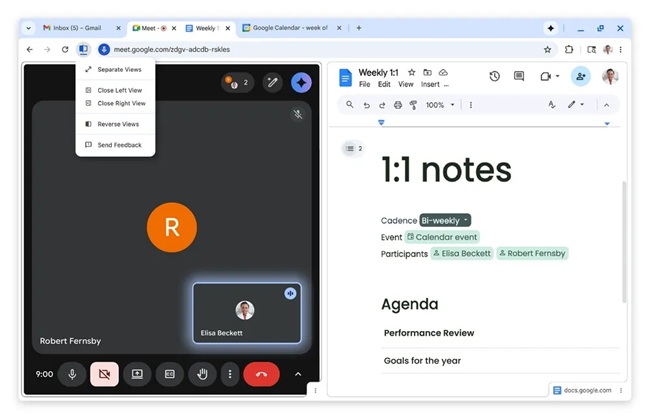
Split View is the headline feature. Instead of managing multiple windows or tab-switching repeatedly, users can now pin two tabs side by side in one window — handy for grading assignments, coding with documentation open, or referencing two pages simultaneously.
PDF Annotations turns Chrome’s built-in viewer into a lightweight document editor. Highlight passages, drop in notes, add digital signatures — all without opening Acrobat or downloading the file first. Students, researchers, and anyone reviewing reports will feel this one immediately.
Save to Google Drive closes the most annoying loop: until now, saving a PDF to Drive meant downloading it locally, then uploading it again. Now it’s a single click from the browser, with files landing in a tidy “Saved from Chrome” folder automatically — searchable and synced across devices.
To get these features, update Chrome to the latest version at google.com/chrome.
Check out our Google Chrome tips and features on TechnoSports and our best productivity apps for Android and PC.