
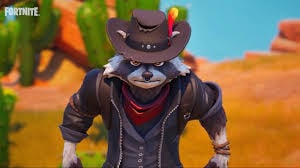
Meet Clyde, the raccoon outlaw with attitude! Fortnite’s newest Epic outfit arrived December 3, 2025 through an exclusive Backbone Pro controller collaboration. While the promotion initially requires hardware purchase, this comprehensive guide reveals how to claim your Clyde skin and what future availability looks like for budget-conscious players.
Table of Contents
Fortnite: Clyde Skin Free
| Requirement | Details |
|---|---|
| Eligibility | Backbone Pro controller owners (new or existing) |
| Controller Cost | $169.99 USD at major retailers |
| Quest Requirement | Earn 100,000 XP on mobile/PC/cloud platforms |
| Promotion Start | December 3, 2025 |
| Platforms | iOS (EU only), Android, PC, NVIDIA GeForce NOW, Amazon Luna |
| Future Availability | Expected in Item Shop later (non-exclusive) |
Step-by-Step: Unlock Clyde with Backbone Pro

Step 1: Purchase or Register Your Backbone Pro
New Buyers: Purchase Backbone Pro ($169.99) from:
- Official website: backbone.com
- Major retailers: Best Buy, Target, Walmart, GameStop, Amazon
Existing Owners: You’re automatically eligible! Just follow the redemption steps below.
Step 2: Claim Your Code
- Download and install the Backbone app
- Connect your Backbone Pro controller
- Navigate to Home screen → Perks section
- Tap “Claim Clyde Outfit Quest Code”
- Check your email for the unique redemption code
Important: Codes are single-use per account and cannot be resold or exchanged for cash.
Step 3: Redeem on Fortnite
- Visit fortnite.com/redeem
- Sign into your desired Epic Games account (choose wisely!)
- Enter your Clyde Outfit Quest code
- The quest activates immediately in your account
Step 4: Complete the XP Quest
Launch Fortnite on any eligible platform and earn 100,000 XP to unlock Clyde!
Fastest Ways to Earn 100,000 XP
Battle Royale/Zero Build (Best XP Rates):
- Survive longer = more XP (placement bonuses)
- Complete daily quests (3 available daily)
- Knock enemies and get eliminations
- Estimated time: 6-10 matches
Creative XP Maps:
- Search “XP” or “AFK” in Discovery
- Some maps offer 8,000-12,000 XP per round
- Fastest method: 1-2 hours total
LEGO Fortnite & Festival:
- Lower XP rates but still count toward total
- Great for casual grinding while relaxing
Pro Tip: Daily quests alone award approximately 45,000 XP. Complete three days of dailies plus a few matches and you’re done!
Platform Eligibility Breakdown
✅ COUNTS Toward Quest:
- PC (Windows/Mac via Epic Games Launcher)
- Android (Epic Games Store app)
- iOS in EU only (Epic Games Store)
- NVIDIA GeForce NOW cloud streaming
- Amazon Luna cloud streaming
❌ DOES NOT COUNT:
- PlayStation 4/5
- Xbox One/Series X|S
- Nintendo Switch
Your account progress syncs across all platforms, but only XP earned on eligible devices counts toward the 100,000 requirement. Once unlocked, Clyde appears in your locker everywhere!
About the Clyde Outfit
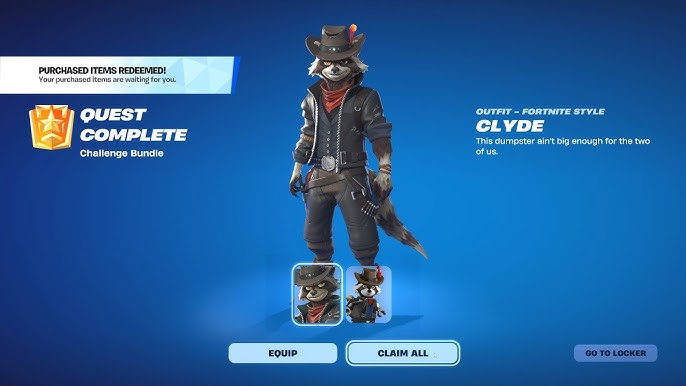
This Epic rarity skin features a raccoon gunslinger with the perfect tagline: “This dumpster ain’t big enough for the two of us.”
Style Variations:
- Standard: Full raccoon cowboy outfit
- LEGO Style: Transforms into LEGO minifigure in LEGO Fortnite
- Bean Style: Becomes Fall Guys bean in Fall Guys experiences
The outfit uses Fortnite’s Rufus character model with unique body proportions, making Clyde stand out in any lobby!
Will Clyde Be in the Item Shop?
Yes! Epic Games and Backbone confirmed Clyde is not exclusive to this promotion. The skin will eventually appear in the Fortnite Item Shop for V-Bucks purchase, likely priced around 1,200-1,500 V-Bucks based on Epic rarity standards.
Timeline Estimate: Expect Item Shop availability 4-8 weeks after the promotional period ends, similar to past hardware collaboration skins.
Is the Backbone Pro Worth It?
Beyond the free Clyde skin, the Backbone Pro transforms your smartphone into a premium handheld gaming console with:
- Dual connectivity (USB-C wired + Bluetooth wireless)
- Compatible with phones, tablets, laptops, and TVs
- Low-latency responsive controls
- Support for 120 FPS on compatible devices
- Access to exclusive app perks
For mobile gaming enthusiasts who play Fortnite, Call of Duty Mobile, or cloud gaming services regularly, the $170 investment offers legitimate value beyond just cosmetics.
FAQs
Q1: Can I share my Clyde code with a friend or family member?
No, each redemption code is linked to the Backbone Pro serial number and can only be used once per user. Epic Games specifically prohibits code reselling, exchanging, or transferring. If you want multiple household members to get Clyde, each person needs either their own Backbone Pro purchase or must wait for Item Shop availability later.
Q2: I primarily play on PS5 – can I still unlock Clyde through this promotion?
Yes, but you’ll need access to an eligible platform temporarily. Install Fortnite on a PC, Android device, or use cloud streaming (GeForce NOW/Amazon Luna) to earn the required 100,000 XP. Since your Epic account syncs across platforms, once Clyde unlocks via mobile/PC XP grinding, the outfit appears in your locker on ALL platforms including PS5, Xbox, and Switch for permanent use.