TechnoSports Media Group
  • Home
  • Technology
  • Smartphones
  • Deal
  • Sports
  • Reviews
  • Gaming
  • Entertainment
No Result
View All Result
  • Home
  • Technology
  • Smartphones
  • Deal
  • Sports
  • Reviews
  • Gaming
  • Entertainment
No Result
View All Result
TechnoSports Media Group
No Result
View All Result
Home Technology

A New Virtual Braille Keyboard by Google is out on Android

Anupam Modak by Anupam Modak
April 11, 2020
in Technology, Application
0
Virtual-Braille-keyboard-by-google_TechnoSports.co.in

Braille was a revolutionary invention for blind and with fewer vision people. Through Braille technology, they were able to read and write easily and reduce their hunger for knowledge. In this computer and smartphone era, the TalkBack feature in a maximum of computing devices and physical Braille keyboards may available. But these are not enough.

Suppose one of our friends with very less vision needs to write a short e-mail quickly or need to short text reply. In this scenario, our friend needs to connect the physical Braille keyboard. This is time taking and the using time is very less. But, there was no option. Yes, there “was”.

RelatedPosts

Creating Memorable Logos for Restaurants and Cafes with CapCut’s AI Logo Generator

Polar Loop India Launch: Screen-Free Fitness Band at ₹19,999

Samsung Partners Instamart for 10-Minute Galaxy Device Delivery Across India

Google launched its virtual Braille Keyboard on Android yesterday. Now, our visually challenged friends can write any text, no matter to post on social media, to mail someone, or to give a reply without adding any physical Braille Keyboard.
Google-Virtual-braille-keyboard_TechnoSports.co.in

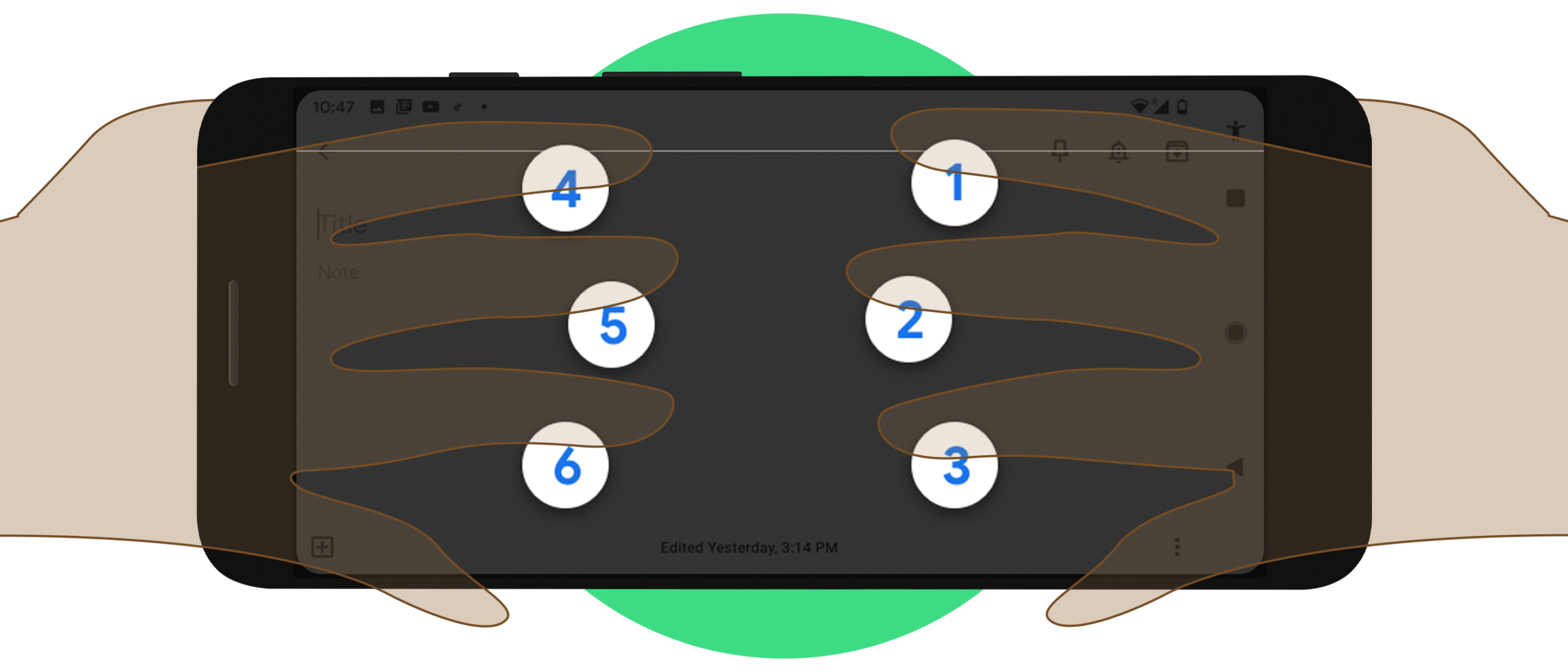
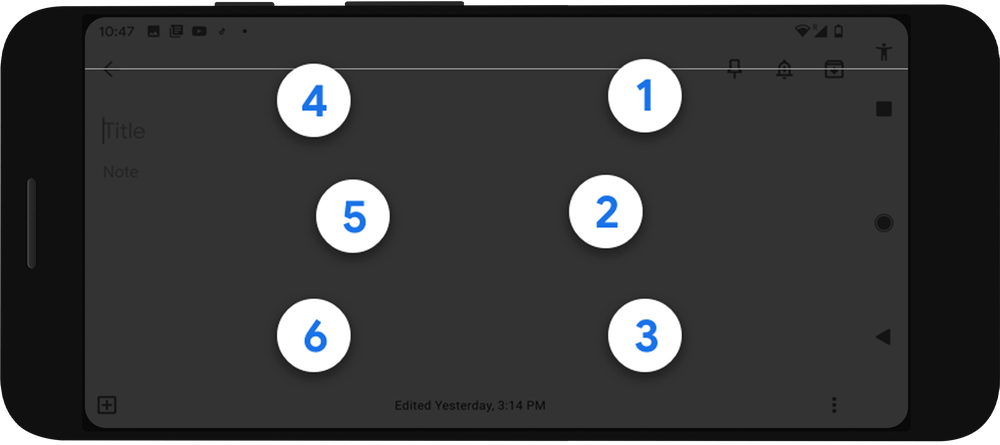
Google team developed this Keyboard with the collaboration of Braille Developers and uses. The reason is to make it familiar for those who typed using Braille before. A standard 6-key layout is used in it, where each key represents one of six braille dots. Our friends can use this keyboard wherever they need to edit text on an Android smartphone.

To use the Google virtual Braille Keyboard on Android, firstly turn on the TalkBack feature and follow the steps. You can switch between the normal keyboard and the braille keyboard just like you can switch between your regular and international language keyboard.

The Braille keyboard is already rolled out. Users of Android with version 5.0 or above can start using it. Only the English Language is available for now. Hoping Google will add more languages later.

In the official blog post, Google said,

“As part of our mission to make the world’s information universally accessible, we hope this keyboard can broadly expand braille literacy and exposure among blind and low vision people”

Do check 👇🏼

https://technosports.co.in/2020/04/10/google-pixel-4a-new-leaks-reveal-more-details/

TechnoSports 😎 Stay Updated

Tags: Braille KeyboardGoogle
Previous Post

A Dedicated Video call button added on WhatsApp groups

Next Post

Barcelona eyes on Sevilla defender Diego Carlos

Related Posts

Creating Memorable Logos for Restaurants and Cafes with CapCut’s AI Logo Generator
Technology

Creating Memorable Logos for Restaurants and Cafes with CapCut’s AI Logo Generator

December 5, 2025
Technology

Polar Loop India Launch: Screen-Free Fitness Band at ₹19,999

December 5, 2025
Technology

Samsung Partners Instamart for 10-Minute Galaxy Device Delivery Across India

December 5, 2025
Technology

Complete Prepaid Airtel Recharge Plans in 2025: All Details

December 5, 2025
Technology

Micron Exits Crucial Consumer Business to Focus on AI Data Center Demand

December 5, 2025
Entertainment

Amazon Alexa+ Scene Jump Feature Now Live on Fire TV

December 5, 2025
Next Post
The Intel Core i9-10900K's Geekbench scores threaten Ryzen 9 3900X

Intel Core i9-10900K chip's Geekbench multi-core score can't surpass AMD's Ryzen 9 3900X

Leave a Reply Cancel reply

Your email address will not be published. Required fields are marked *

TechnoSports Media Group

© 2025 TechnoSports Media Group - The Ultimate News Destination

Email: admin@technosports.co.in

  • Terms of Use
  • Privacy Policy
  • About Us
  • Contact Us

Follow Us

wp_enqueue_script('jquery', false, [], false, true); // load in footer
No Result
View All Result
  • Home
  • Technology
  • Smartphones
  • Deal
  • Sports
  • Reviews
  • Gaming
  • Entertainment

© 2025 TechnoSports Media Group - The Ultimate News Destination